Install & configure Big Blue Button on Ubuntu 18.04 only in 10 minutes

Below are the simplified steps for installing BBB:

Make sure you have Ubuntu 18.x on the server and you have root access.

Then run this command:

wget -qO- https://ubuntu.bigbluebutton.org/bbb-install.sh | bash -s -- -v bionic-230 -s yourdomain.com -e [email protected] -w -g

EDIT:

nano /etc/nginx/sites-available/bigbluebutton

Add this code at the bottom of the file

location = / {
        return 307 /b;
}

Then restart NGINX server

sudo systemctl restart nginx

Now Install Greenlight

cd ~/greenlight
docker pull bigbluebutton/greenlight:v2
docker-compose down
docker-compose up -d
cd ~
sudo bbb-conf –status

And we are done.

Easy way to Change Woocommerce default user Role.

Easy way to Change Woocommerce default user Role.

Hello buddy,

I want to share something with you about Easy way to Change Woocommerce default user Role customer to something you need or like. I was working on LMS project so wrote down few lines of code that I want to share with you. May it help you.

Woocommerce allows WordPress user registration at checkout and my account page. It creates user by default role as customer. But for purpose of your project,sometime you may need other role other than customer. As in LMS project, I wanted user to have student role, who registers at checkout page. So not need to worry for that. Woocommerce Gives a control over it using via a filter `woocommerce_new_customer_data`.

In \wp-content\plugins\woocommerce\includes\wc-customer-functions.php : line 102

<?php
$new_customer_data = apply_filters( 'woocommerce_new_customer_data', array(
    'user_login' => $username,
    'user_pass'  => $password,
    'user_email' => $email,
    'role'       => 'customer'
) ); ?>

In above lines extracted from Woocommerce, woocommerce_new_customer_data is filter applied over $new_customer_data variable. Still user is not registered, so you can deal with users data as you wish, wp user get created.

You can filter User Role by changing value in Array ($new_customer_data) provided by woocommerce_new_customer_data filter. You must use add_filter action in you theme’s function.php file or your plugin file. Write your own function like my_new_customer_data().

Dafault format of filter is as below.

<?php add_filter( $tag, $function_to_add, $priority, $accepted_args ); ?> 

You have to pass minimum 2 parameters to add_filter action. i.e. $tag, $function_to_add

<?php add_filter( 'woocommerce_new_customer_data', 'my_new_customer_data'); ?>

In your function just have to replace value of key index which is ‘role’. You can directly specify user role like option one as shown below or You can get default user role from WordPress default user role option(Which is in general settings) like option two.

Option one:

<?php $new_customer_data['role'] = 'student'; ?>

Option two:

<?php $new_customer_data['role'] = get_option( 'default_role' ); ?>

Hence finally you just have to add below lines of code to your theme or plugin. Enjoy WordPress and Woocommerce with your project. Happy coding. 🙂  🙂  🙂

<?php
function my_new_customer_data($new_customer_data){
 $new_customer_data['role'] = get_option( 'default_role' );
 return $new_customer_data;
}
add_filter( 'woocommerce_new_customer_data', 'my_new_customer_data');
?>

Force entire WordPress website over SSL/HTTPS

Force entire WordPress website over SSL/HTTPS

Force entire WordPress website over SSL/HTTPS using .htaccess file

This tutorial is for you if you are searching for Force entire WordPress website over SSL/HTTPS or Force entire website over SSL/HTTPS or Redirect all request from http to https

Its is very easy using .htaccess file. If you have access to server files and you are using apache server for your website. Go to server web root directory. Edit .htaccess file and add below lines of code before WordPress rewrite code which starts with # BEGIN WordPress Or if you running a non WordPress website, then add this code before any rewrite code or at start of .htaccess file.


# Begin Force website over SSL by MakarandMane.com

RewriteEngine On
RewriteCond %{THE_REQUEST} ^[A-Z]{3,9}\ /(.*)\ HTTP/ [NC]
RewriteCond %{HTTPS} !=on [NC]
RewriteRule ^/?(.*) https://%{SERVER_NAME}/$1 [R=301,QSA,L]

# End Force SSL

Force entire WordPress website over SSL/HTTPS using WordPress Coding

If you are not familiar with htaccess or you don’t want to touch htaccess file or You want to handle WordPress, then you can also force website to https using php header funciton or WordPress wp_redirect. You can use any one method to redirect page.

PHP Header function

header('HTTP/1.1 301 Moved Permanently');
header("Location: https://" . $_SERVER["SERVER_NAME"] . $_SERVER["REQUEST_URI"]);

WordPress wp_redirect function:

wp_redirect('https://' . $_SERVER['HTTP_HOST'] . $_SERVER['REQUEST_URI'], 301 );

You have to use WordPress template_redirect action to redirect web-pages.

add_action('template_redirect', 'force_ssl');

We have write a function for this action. In function force_ssl we will check whether current page is opening on ssl using is_ssl() WordPress conditional function. I am writing same function using both method we discussed above. Both works same way.

function force_ssl()
{
if (!is_ssl () )
{
header('HTTP/1.1 301 Moved Permanently');
header("Location: https://" . $_SERVER["SERVER_NAME"] . $_SERVER["REQUEST_URI"]);
exit();
}
}
function force_ssl()
{
if (!is_ssl () )
{
wp_redirect('https://' . $_SERVER['HTTP_HOST'] . $_SERVER['REQUEST_URI'], 301 );
exit();
}
}

If you want to disable to force SSL you have to comment or remove code. But every time you to go theme files and make changes. So better way if we make a switch which can help us to enable and disable SSL mode by doing small change. So for this purpose we can define a constant in wp-config file.

define('FRONT_END_SSL' , false);

We will add action if contrast FRONT_END_SSL is defined. Then if website is not running on ssl and constant is set to true we will redirect visitor to https.

if (defined('FRONT_END_SSL'))
  add_action('template_redirect', 'force_ssl');

function force_ssl(){

if ( FRONT_END_SSL && !is_ssl () )
 {
  wp_redirect('https://' . $_SERVER['HTTP_HOST'] . $_SERVER['REQUEST_URI'], 301 );
  exit();
 }
}

References:

https://yoast.com/wordpress-ssl-setup/
http://www.wpwhitesecurity.com/wordpress-security/definitive-guide-wordpress-ssl-setup/

Add filter to Admin list for all custom post types by their custom taxonomies

Add filter to Admin list for all custom post types by their custom taxonomies

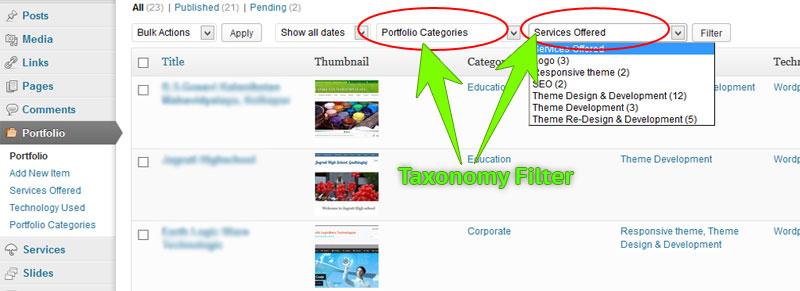
Adding filter to every custom post type by giving its taxonomy every time increases code length.

Also I posted on stackexchange


add_action( 'restrict_manage_posts', 'my_restrict_manage_posts' );

function my_restrict_manage_posts() {
    global $typenow, $post, $post_id;

	if( $typenow != "page" && $typenow != "post" ){
		//get post type
		$post_type=get_query_var('post_type'); 
	
		//get taxonomy associated with current post type
		$taxonomies = get_object_taxonomies($post_type);
	
		//in next loop add filter for tax
		if ($taxonomies) {
			foreach ($taxonomies as $tax_slug) {
				$tax_obj = get_taxonomy($tax_slug);
				$tax_name = $tax_obj->labels->name;
				$terms = get_terms($tax_slug);
				echo "<select name='$tax_slug' id='$tax_slug' class='postform'>";
				echo "<option value=''>Show All $tax_name</option>";
				foreach ($terms as $term) { 
					$label = (isset($_GET[$tax_slug])) ? $_GET[$tax_slug] : ''; // Fix
					echo '<option value='. $term->slug, $label == $term->slug ? ' selected="selected"' : '','>' . $term->name .' (' . $term->count .')</option>';
				}
				echo "</select>";
			}
		}
	}
}

Hide or Remove Word Press admin bar

Hide or Remove Word Press admin bar

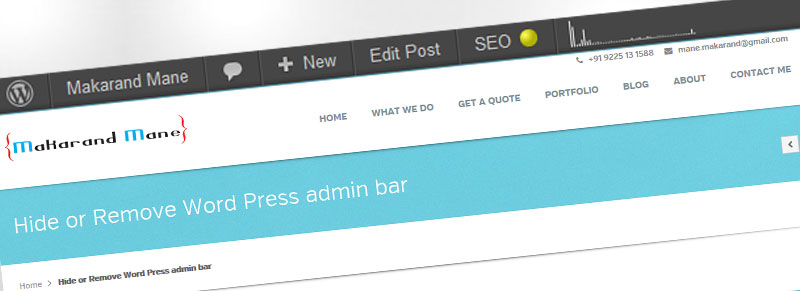
WordPress 3.1+ introduced a new feature : the Admin Bar. It is quiet cool and helpful feature. But while developing www.yogeshbabar.com I required to remove it when subscriber is logged in, so that they will not get access to dashboard. Also I have discussed this topic on wordpress.

For my developer friends below I’m going describe many short and simple techniques to hide or to remove WordPress admin bar.

1. Very simple one technique to hide to wordpress admin bar is..

add show_admin_bar(false); i hidden admin menu bar from my web site on front end… using

Below code only shows admin bar on front end for administrator user..
if other than admin user logs to web site then admin bar will not be displayed…

i added below code to my themes header yogeshbabar420.com..


<!--?php <br ?--> global $user_ID;
if( $user_ID ) :
if( current_user_can('level_10') ) :
show_admin_bar(true);
else : { show_admin_bar(false);
echo '</pre>
<style type="text/css"><!--
html{margin:0 !important;}
#wpadminbar{display:none; visibility: hidden;}
--></style>
<pre>
'; }
endif;
endif; ?>

user check …. hide for all
hide for perticular user

For my non-developer friends below only one short and simple technique to hide or to remove WordPress admin bar.

Simply use a plug-in named as Global Hide/Remove Toolbar Plugin and bye-bye to Word press admin bar. This plugin let you easily add a global option to hide/remove the front end Toolbar for logged in users for WP 3.1+ .

Download Global Hide/Remove Toolbar Plugin