Awesome Experience after doing Twin heart Meditation on 6th Feb, 2016
A Loving Atma Namaste, Just finished GMCKS Twin Heart Meditation

Hey guys,
There are many ways to Create Bootable USB mac osx installer, but I am going to explain only useful information here.
*** ONLY IF ABOVE WON’T WORK!
UltraMDG from SYSGeeker is an easy-to-use application helping you to create a bootable USB installer from macOS without clicks, no command required and risk free. It supports burning 5+ image file to USB flash drive or DVD/CD, including DMG, Bin, Img and Raw and support the latest macOS monterey and big sur.
Step 1. First of all, you need to download and install UltraDMG on your Mac or windows computer, then launch it.
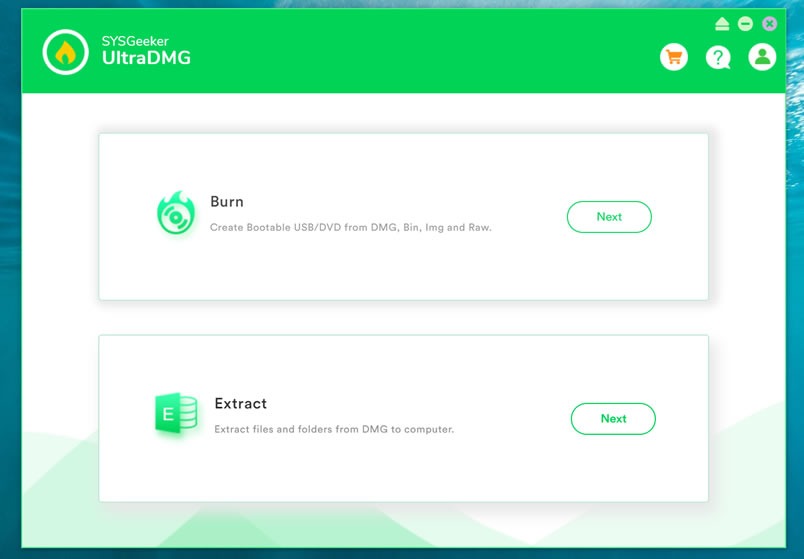
Step 2. To create a macOS bootable USB drive, you need to select ‘BURN’ option and browse your local DMG file, then connect your USB flash to your computer.
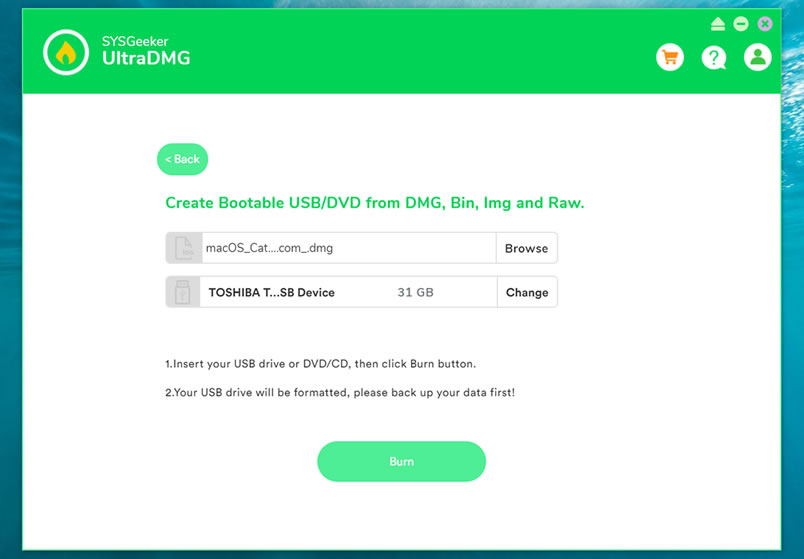
Step 3. It will take about 10 minutes to finish the burning process, please wait it to be completed, and don’t disconnect your USB drive during the burning.
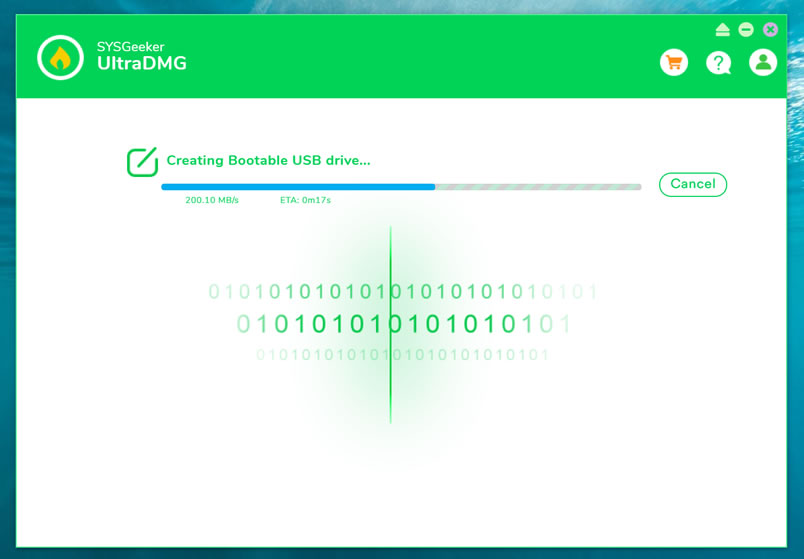
Step 4. When it shows “Burning Completed”, means you’ve successfully created a macOS installer. Now, you can connect your USB to your broken Mac computer and install the new macOS.
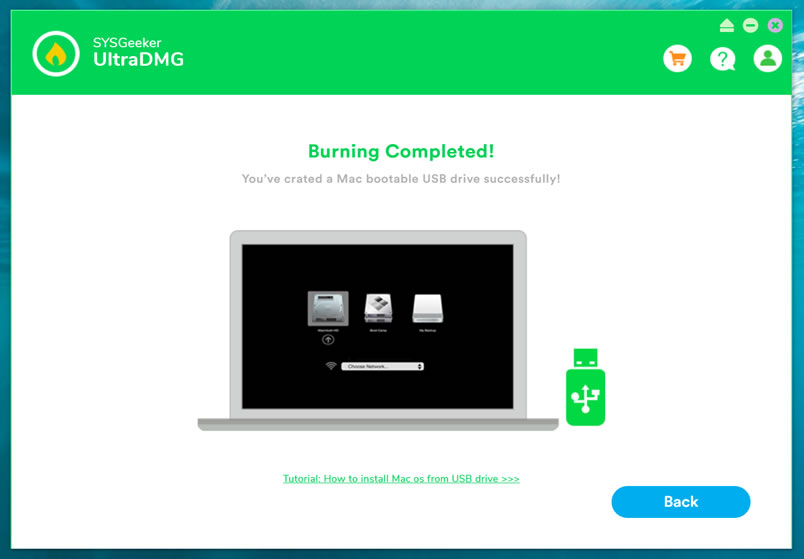
There are numerous situations when a bootable USB macOS installer may come in handy, SYSGeeker UltraDMG will be your best assistant to help you easily reinstall mac system without complicated command line. It allows every novice to reinstall the system by themselves.
I Hope it helps!
*** When I was trying to make a mac OS X usb bootable drive, I googled so much & found many blogs telling me how to make it form running Mac OS. But no one tells, how to make Mac OS X bootable installer pen drive from windows. I hope it will help you. For any reply or suggestions please comment.



Comments are closed.
Copyright 2011-2026. Makarand Mane - All rights reserved. Powered by WordPress


O link não está mais disponivel, qual a versão exata do Power Iso que voce usou? Estou precisando instalar um macOS em um macbook com o SSd limpo mas não tenho outro mac disponível p criar o pendrive bootavel. TransMac e o Balena não estão dando jeito.
Hi Flp Pnnt Alf
I would love tell you that, but wrote article in 2013 & now I dont remember it properly.
Hope you had found some another solution for same.
This blog about How to Create Bootable USB Mac OS X installer
from Both Windows and Mac has helped me a lot, is very well written.
Thank you this method actually worked over what transmac offered
Happy to hear that it helped you.
cannot download poweriso as torcache is no longer… adfly sucks.
I have yosemite dmg file on my Windows PC, I want to install OS on my PC having 8GB ram and 1tb had, how can I install Mac OS on my non Apple PC. Give all instruction in detail.
HI, i need to restore my MAC for a yosemite which i am not able to find in apple store. Can you please share a .dmg for to create a bootable usb from windows
Right now, I dont dmg file of yosemite OS
Bro. I finished as you said in my pen drive both the methods in my windows PC by downloading bootable Mac os installer.DMG . after finished I boot into the pen drive in both UEFI and Legacy but it displays that this not containing Os and it displays error. What can I do? Reply sir
Hey. Thanks for the tutorial, but it doesn’t work. I followed your steps and when I plug in the USB stick in my macbook it doesn’t show up even if i press “C” key or “option” key.It only shows the HDD partition called Windows. Any advice ?? Thanks
Which OS you have already installed, right now on your macbook? Are you able to boot via pen drive or not?
You can send me screenshot if you can?
I have windows 7 installed on my mac. How can I send you a picture?
Actually I had did this experiment for installing a macintosh on windows pc. I never tried to boot on macbook. Can’t help you now on this. You can mail me screenshot.
boot what invalid or corrupt kernel
hello Mane, thanks for your help. my own case is peculiar, i have a macbook pro, i mistakenly formatted my mac hard drive , now i want to do a clean installation of mac os, with a pen drive made bootable with windows, how do i achieve that.
First I want to say thanks. I looked all over the net but I don’t see anyone actually telling me how I can make bootable pen drive and finally I get it. I have a question, I can run windows and mac in different drive using this? Does this allow me? I really need to run both. May I need to set any other bios settings?
created bootable usb through poweriso , but when i am booting my laptop with usb nothing happens
it simply starts with windows.
Hi Rishabh
Simply check your BIOS settings for booting. Give high priority to flash drive. If you are already using Windows 8 then it forcefully skips bios check, then you can terminate windows forcefully and try to reboot. Or you can press F10 or F12 at start to get boot selection menu and boot via USB.
hey i m using windows 10 on dell inspiration 3537
and i am not able to give high priorities to flash drive
please help 🙁
Hi Reshav,
In this case you have help yourself. You must look inside bios settings. I never used DELL. So don’t know its bios keys. Generally its F2 or DEL.
If Windows 10 skipping bios check, then terminate machine abnormally by pressing power button until you are able to access bios (generally 2-4 times).
in your bios you need to change UEFI to ACPI and you will be able to boot to your usb !!
change UEFI to LEGACY on your bios
Im trying to make a bootable usb on this PowerISO app but my usb isnt showing up in the drop down menu, do i need to format it ?
Hi audre,
If it detected and shown in your computer then it should show in PowerISO. Try reformatting pen drive but I don’t that is issue. It should not happen if pern drive working well.
I had the same problem till I ran the program is admin
you are a LEGEND
Absolute beauty! Thanks
i have Mac Os x yosemite installer downloaded in torrent i cannont booth it in the USB because PowerISO dont sopport the file..how can i solve this?
us transmac
Thank you for taking time to reply to all of our questions
Hi, the PowerISO App cannot open .dmg file… Any suggestions?
You are most welcome
Forgot macbook pro password,tried to reset by Command S key & when i press option key, LOCK icon is showing , how to reset the lock icon password
Thank you, it worked, i been working on it for 2 days 🙂
I have Is X Yosemite.app How can I boot it into USB ??
hey.. frnd i need yosemite.app file bcoz im not able to download that from app store bcoz i complty formatted ma macbook.. can u email that at [email protected] please
Thanks a Lot Makarand!…
Your Trick worked like Charm
Thanks Raul,
Really happy to listen that it helped you.
Hi Mr. Mane. I have Macbook 2010 and deleted all my hard drive. Internet recovery gives me a warning like item could not be found when trying to download. Can you give me some instructions to download a latest OS X version where I will have legal copy of latest IMovie? Thank you in advance.
Hi Celal,
This may resolve your issue. https://www.apple.com/in/mac/imovie/
https://itunes.apple.com/in/app/imovie/id408981434?mt=12&ls=1
mr. Mane, thank so much for your support but I still have a problem, after I created the bootable pen drive in windows I did not see my pen drive after restarting Macbook Pro
Hey max,
Nice to here from you that, it helped you. Just check your bios settings for, is it has higher boot priority for USB device. Onc check that pen drive is Prepared proerly by booting other machine or virtual machine.
Hey Mak
Theres no such thing as a bios setting in a Mac to change the priority is this tutorial to boot pen dive in windows i
have same problem as Maxwell wont boot in Mac do i need to add a bootloader with power iso
grundy1960
Hey Grundy,
I wrote this tutorial to prepare bootable pen drive of MAC in windows. In Mac OS there is default tool present in OS which helps you to prepare Bootable stick. I never used Mac machine actually, so cant say that bios setting exist there or not. But I am sure there must be any tool which will help you to change priorities bootloader.
Dear Makarand, about making the MAC bootable USB in windows is it necessary to format the drive using certain program or just right click-format will do?
No need of any certain program. It will be done by powerISO while preparing bootable pen drive. You can also format by same procedure(right click-format).
Thanks ; it helped.
Great. Enjoy Macintosh ..
Hi Makarand Mane,
My Powerbook G4 doesn’t have an option for BIOS as the HD messed up. How can I boot the USB automatically?
Thanks
yesterday without taking backup i have formated the macbookair.after formatting i thought i can install it.but its downloading from server which is very slow.so i have downloaded mavericks.dmg file from torrentz.so how can i install it from a usb drive.sir,could you plz explain what to do?
First follow tutorial to prepare pendrive. If you mac machine then I think pen drive will work automatically. If you have another machine where you use like windows OS then you have use third party software to boot that pen drive.
Those who did not find any USB drive detected in PowerISO. Just “Run as Admin”
Thanks lol! almost had given up lol.. 😀
Intel pc install mac. …
thanks too! almost given up!
I have i5-3570K, asus z77-a, 8gb ram, geforce GTX660, ssd 250gb…
Can i install mac os x mavericks on clean OS PC with bootable USB i made from your way above?
To Install Mac successfully you PC virtualization enabled in BIOS. Computers from and above I3 supports hardware virtualization. check your bios settings and go ahead.
Here my laptop spesification : Proc: AMD A6-3400M, Bios: Phoenix Securecore Tiano, VGA: ATI Radeon HD 6520G. Will this tutorial work for my laptop? I have Niresh Mavericks. Thanks a lot!
Surely this will help you to create Bootable pen drive.. Go ahead. Please reply your feedback on this.
So here’s a question: My Mac has been formatted, I can’t access any other PC than a Windows 7 one and I’m downloading a Mavericks 10.9.2 DMG file. Will this tutorial work to load Mavericks to a USB and then boot it on my MacBook AIR to install the OS X?
Surely it will work to make bootable pendrive. Please comment what result you get or any problem you found??
my macbook pro 2011 can not see when option
Please question in detail.
Pretty cool your post, and more the people who keep asking how to install it on their windows pc/laptop when even the post name is “HOW TO CREATE A Bootable USB Mac OS X installer from Both Windows and Mac”. xD BUT much more cool is that your post is likely the same that I found a year and half ago. http://www.osx86.net/topic/10680-make-a-bootable-usb-mac-os-x-installer-both-windows-and-mac/.
Nice recycling.
Hi Bryan,
Thanks for comment. Link you said in comment, I took raw material from same link. That’s why both are same. At end of blog I wrote that I googled a lot… and finally got this useful link. Thought to share with world, for persons who seek for this Information like me.
Hello
I have a Dell Laptop model n 5010 With i3 can I Install Mac On my Laptop i have os snow lepord .dmg file how can create a bootable usb from my ussing windows
help me
Hi LalitSan,
Please follow procedure given in post to create bootable pen drive in windows. To install Apple your laptop must support hardware virtualization. Intel core i3 should be having VT-x support. Go Ahead.
i have try your given follow steps pls send me step by step guide for install mac on windows from usb
i have try many step but i cannot install mac in my laptop
thanks
Hi Lalitsen,
Sorry to say, but in above post, I have just written steps to make bootable pendrive. So to install Mac go through youtube tutorials
I’ll make an bootable usb in windows.
Could you refer me an bootable mac. Where can i download it. Could you send me an link ?
Thanks a lot.
try this http://adf.ly/RkxU0
thx a lot, but I tried both iso /dmg files. I made a bootable usb and dvd but if i restart my comp and boot from dvd or usb it doesn’t see it and start my windows again. what sould i make?
Note: my hdd is 2 parts. 320GB totally 1. part is 200GB(which I want install mac) 2.part is 120GB(I have other files, just file no OS)
Please check out Boot Priorities in BIOS settings.
hello, I downloaded this dmg file.
Is this an bootable Mac ?
http://adf.ly/Te3wP
Yes, you can that file for making bootable pendrive
My PC has no vt-x support so I need a mac os x installer like wubi to safely install it inside windows. Pls let me know if there’s something available!..
If your PC do not have vt-x support, then Mac can not be installed
I meant to install mac on the real pc, not vm. I have emachines e725 with intel core 2 duo, 3 gb ram and 250 gb hdd and some people on InsanelyMac had succesfully installed it on this configuration.
Wubi has an option to install ubuntu inside windows(into a large file without creating a new partition). I don’t want to endanger my hardware and important data so i’d prefer to install mac the same way.
As I know Mac needs hardware virtualization support. Intel core 2 duo should be having VT-x support, that’s why they are successful. If you have this configuration then definitely try.
I never tried for Wubi for installing ubuntu inside windows. But this option is definitely preferable. Go ahead. Anything useful please comment.
I have Lenovo Z570 laptop, with 4GB RAM, and i was downloded Mac OS X 10.6 that was in .dmg extension, then how to install this mac on my laptop..? & will it support or not..?(in 2011year i was bought).. please suggest me..!
If hardware of your laptop supports Virtualization Technology, then try to install Mac, otherwise installation will not start. Check your Bios settings to get sure about VT-x/AMD-V enabled.
Hi Mr. Mane, i wanna “os x 10.5 (9A3111)” to download & install on my MacBook as i have missed installer discs. Would you please give me a link to download the same.
Model No: A1181 (EMC 2200), os x 10.5 9A3111.
Thanks.
Try below link, hope may help you
http://adf.ly/Te49t
Hey
If I create the bootable USB via downloading the installer on windows and using the windows method, will I still be able to use that USB to restore/recover on my macbook air?
Thanks
HI Maulik,
I never used Macbook air. Not sure but definitely it should work.
Cool what I meant to say is will it still work as a Mac boot device, if it is formatted on windows(dos type) instead of mac os x extended. Or will I have to partition/format the usb on a mac to make it work as a boot device for my macbook.
Yes Maulik, It will work definitely. It’s Mac boot device so you can use it on Macbook Air.
Do u know we’re OS X installer
I cant understand what you want to say.
I was wondering were u can download an copy OS X
Their is retail copy of OS X available in market. http://store.apple.com/us/product/MC573Z/A/mac-os-x-106-snow-leopard
It can be downloaded from torrent… http://adf.ly/RkxU0
Hi Makarand, So are you able to make bootable pen drive installer from Mac OS X dmg file
Hi Parag, Whatever procedure given for windows in this post I had practically gone, & after success I posted it. If you have any trouble, please comment.
Thanks ; it helped ; actually was searching it many blogs but its useless
Thanks ; it helped ; actually was searching it .
It shows an error.. Unable to Restore. USB is busy. (am using MAC OS X 10.7 in VMWare WS 9)
Try again after restarting VMWare. If not done tell me at what stage you are getting this error.
have been all day searching for some way to do this. thanks man, I hope it Works.
Hey kazuki yano,
Thank you for first comment on my website. I hope It will work for you definitely. I am also posted this after searching for lots of stuff.